
Contractor invoice template for labour, materials, and project billing.
This editable contractor invoice template separates time, materials, and supporting services so the client can understand the work and match it to a project reference.
 Open this template →
What should a contractor invoice include?
A contractor invoice normally shows: your business name and contact details; the client's name and address; a unique invoice number; the issue date and payment due date; a project or job reference (and a PO number if the client uses one); labour listed by hours and rate; materials listed separately; any other services; a subtotal, the tax charged and a total; and how and when to pay. Listing labour and materials on separate lines lets the client check each against the quote or job record.
This is common practice, not a legal checklist. Required items differ by country and trade (for example, a contractor licence number is required in some places and not in others). For the EU VAT basics, see what an invoice must include.
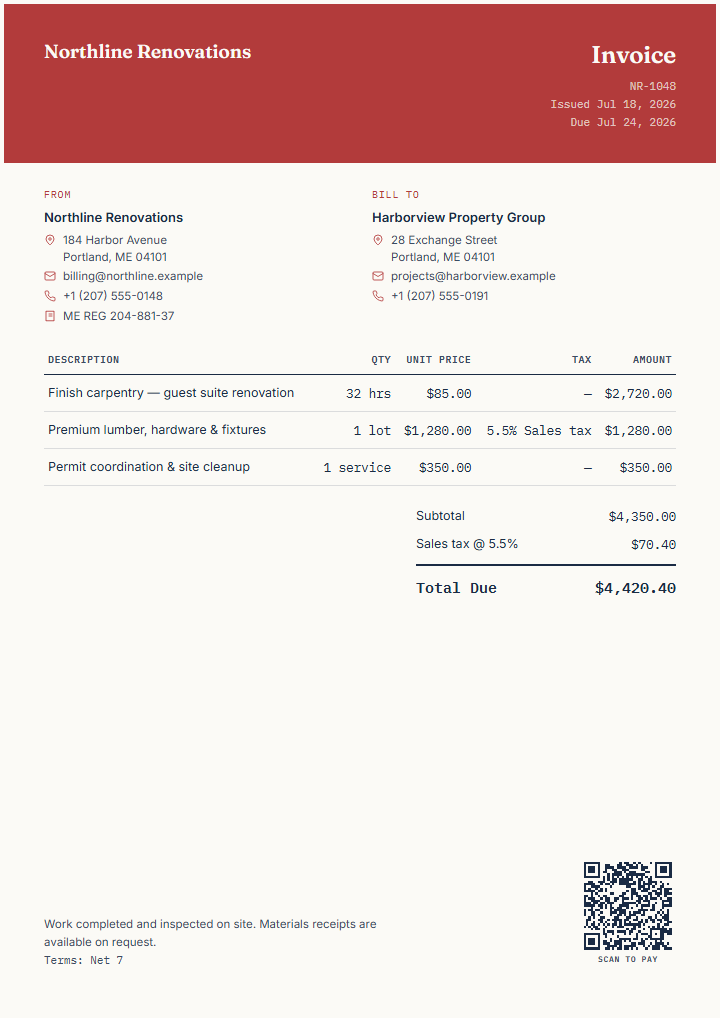
| Line | Quantity | Unit price | Tax | Amount |
|---|---|---|---|---|
| Finish carpentry — guest suite renovation | 32 hrs | $85.00 | None | $2,720.00 |
| Premium lumber, hardware & fixtures | 1 lot | $1,280.00 | 5.5% sales tax | $1,280.00 |
| Permit coordination & site cleanup | 1 service | $350.00 | None | $350.00 |
| Subtotal | $4,350.00 | |||
| Sales tax at 5.5% (on $1,280.00) | $70.40 | |||
| Total due | $4,420.40 | |||
Amounts and rates are fictional and the tax treatment is only an example. Check what applies to your work and location.
Why contractors choose this template
- Separate labour and materials line items for a clear client review.
- Support for hourly rates, flat fees, and custom units.
- Payment terms and project references keep client teams aligned.
- Export directly as PDF, PNG, or SVG without signup.
Sample invoice content
The finished example uses fictional renovation data and combines work that is priced in different ways.
- Finish carpentry: 32 hours at an hourly rate
- Materials: one taxable lot of lumber, hardware, and fixtures
- Supporting service: permit coordination and site cleanup
- Payment details: Net 7, project reference, and scan-to-pay link
How to use it
Open the template, then replace the seller and client, invoice number, dates, project reference, line descriptions, quantities, rates, tax treatment, payment destination, and notes. Remove any line that does not apply rather than sending demonstration content.
Fields to replace before sending
Share expected labour and allowances before final billing.
The fictional contractor estimate separates expected hours, a materials allowance, cleanup, tax, validity, and uncertainty. It does not approve work or automatically become an invoice.
Know the limits before you send it.
InvoiceCraftly separates labour and materials, applies tax per line, and exports the finished invoice. It does not calculate permit fees, track job-site hours, or confirm the tax rate that applies to your trade.
Use the Estimate starting point above before work is approved, or a Credit note if you need to correct an invoice already sent.
Common contractor questions
Can I bill both labor and materials on one invoice?
Yes. InvoiceCraftly supports multiple line items with different descriptions, unit types, and tax rates on the same invoice.
Do I need an account to export this invoice?
No. You can export PDF, PNG, or SVG directly from the browser without signing up.
Can I add a project reference or PO number?
Yes. Use the Payment section to add a PO/reference field, and it appears on the invoice for the client's accounting team.
Ready to invoice your next job?
Customize this invoice templateFictional example data: Replace and verify every demonstrated business, identifier, rate, payment link, reference, and amount. InvoiceCraftly does not determine the legal or tax requirements for your work.