Repair technician · Estimate → Invoice → Credit note

Separate an expected repair cost from final billing and corrections.

Bob is a fictional independent repair technician assessing a commercial appliance for a fictional neighbourhood café. The workflow keeps inspection assumptions, completed parts and labour, and a later price reduction distinct.

Example scenario: The person and business described on this page are fictional and demonstrate a possible InvoiceCraftly workflow. This is not a customer testimonial.
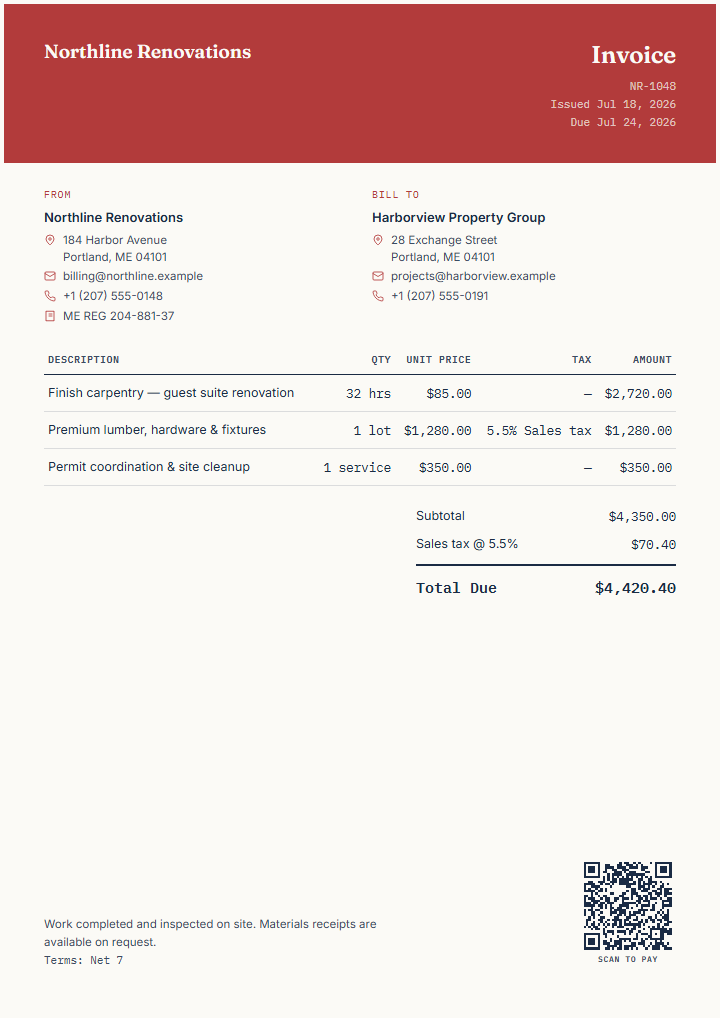
Finished fictional contractor invoice demonstrating separate labour and material lines
Illustrative InvoiceCraftly contractor export. Replace every field.
01Estimate02Invoice03Credit note
Fictional business need

An inspection reveals likely work, but the final parts and time are not yet certain.

Bob's fictional service, ClearDay Repair, has inspected a café display refrigerator. An estimate presents the expected diagnosis, parts, and labour with clear assumptions. The final invoice records what was actually supplied. A later credit note documents a reduction after one replacement component is returned.

Stage 01

Estimate the likely parts and labour

Use an estimate when the final cost depends on findings or availability.

Create an estimate

Example line items

Expected workUnitExample amount
On-site diagnostic inspectionvisit$95
Temperature-controller replacementpart$185
Installation and testing2 hours$160

State the uncertainty

  • Explain that parts and labour are approximate until work is completed.
  • Identify assumptions, exclusions, validity, and any call-out charge.
  • Avoid describing an estimate as a guaranteed final price unless that is genuinely agreed.
  • Verify local consumer, tax, and repair-disclosure requirements independently.
Stage 02

Invoice the completed repair

Replace expected quantities and prices with the supplied parts and actual labour.

Use contractor template

Final billing example

Supplied workUnitExample amount
Diagnostic inspectionvisit$95
Controller and sensor kitparts$230
Installation, calibration, and test2.5 hours$200

Manual transition

InvoiceCraftly does not approve work or automatically turn the estimate into an invoice. Bob can create a separate invoice, or intentionally duplicate the local estimate and change its type, then replace assumptions with completed-work details and independently verify every amount.

Review items and calculations →
Stage 03

Document a later reduction

Use a credit note when earlier billing needs a connected correction or reduction.

Create a credit note

Fictional correction

The unused sensor from the kit is returned, reducing the earlier charge by an illustrative $45. The credit note identifies the original invoice reference, describes the returned component, and shows the relevant reduction according to the issuer's own accounting and tax requirements.

Check before issuing

  • Reference the earlier invoice or transaction clearly.
  • Explain the reason and the affected item or amount.
  • Confirm whether amounts should be positive or negative for the recipient's process.
  • Do not treat a credit note as proof that money has already been refunded.
Read the credit-note format guide →

InvoiceCraftly features used

  • Estimate, invoice, and credit-note document types.
  • Separate labour, parts, quantities, rates, discounts, fees, and tax lines.
  • References, notes, payment details, logo, colour, and optional QR.
  • Browser-local duplicate workflow and PDF, PNG, or SVG export.

Limits to keep visible

  • No work authorization, customer approval, inventory, refund, or payment tracking.
  • No automatic conversion or accounting link between documents.
  • No validation of repair obligations, tax treatment, warranty, or credit-note rules.
  • No server copy if local browser data is cleared without a backup.